What students learn
- Supply must meet demand every hour
- Power (MW) and energy (MWh)
- Solar and wind change with the weather
- Energy storage and efficiency
- Battery power limits at peak times
- Backup power and CO₂ emissions
- Shifting demand to sunny hours
- Long-duration storage (pumped hydro)
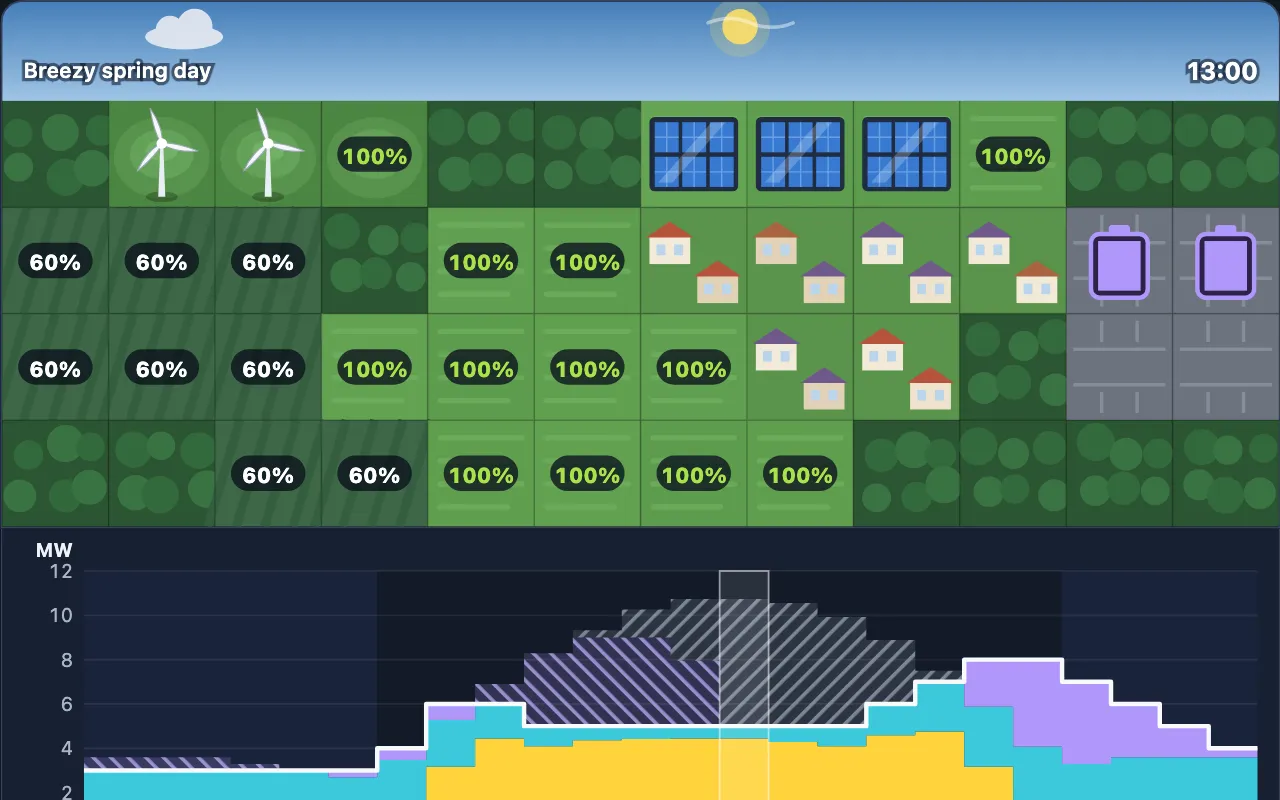
Grid Manager is a free renewable energy game. Students keep a town powered every hour of the day using solar farms, wind turbines, batteries, pumped hydro and, on later levels, gas plants. A chart under the map shows hour by hour where the town’s power comes from, what is charging the batteries, what is wasted, and where the blackouts are. The goal is to keep the lights on for as little money and CO₂ as possible.
How to play
Choose a machine and tap squares on the map to build it. Each square shows how much sun or wind it gets: hilltops are windier, valleys are shaded. Move along the chart to see any hour on the map, with the sun, the turbines, the battery levels and the houses’ lights. Then press Run the day to play it through. If there’s a blackout, the game explains why: not enough energy stored, or batteries that can’t deliver it fast enough.
Each level earns up to three stars: one for keeping the lights on (and under the CO₂ limit), two for staying within the budget, and three for matching the cheapest design we know.
The levels
| # | Level | Years | Big idea |
|---|---|---|---|
| 1 | Sunny School | 9 | Supply must meet demand every hour |
| 2 | After Dark | 9 | Storage moves energy from day to night; MW vs MWh |
| 3 | Windy Hill | 9–10 | Mixing sources; where you build matters |
| 4 | Evening Rush | 10 | Battery power (MW) vs energy (MWh) |
| 5 | Grey Skies | 10–11 | Designing for the worst day |
| 6 | Backup Plan | 11–12 | Gas backup, CO₂ limits, cost vs emissions |
| 7 | Smart Timing | 12 | Moving flexible demand to sunny hours |
| 8 | Still Week | 12–13 | Long-duration storage for a still, grey spell |
Tips for teachers
- Year 9: After Dark makes the link between power and energy concrete. Ask how many megawatt-hours the town uses at night before students build any batteries.
- Years 10–11: Evening Rush and Grey Skies show why a grid needs more than average output. Ask students to explain a blackout from the chart.
- Years 12–13: Backup Plan, Smart Timing and Still Week are real energy-policy trade-offs: cost against emissions, storage against demand-side response. They work well for discussion and extended writing.
Every level ends with a short “What you learned” summary you can use as a plenary.
Curriculum links
- KS3 Scienceenergy resources, renewable and non-renewable
- GCSE Physicsnational and global energy resources; energy, power and efficiency
- GCSE Design and Technologyenergy generation and storage
- GCSE Geographyenergy supply, energy security and sustainability
- A-level and post-16energy storage, grid balancing and demand-side response
Controls
| Tap or drag on the map | Build the chosen machine (tap again to remove) |
|---|---|
| Move along the chart | See any hour on the map |
| Drag a job on the timeline | Move a flexible job (Smart Timing) |
| Arrow keys + Enter | Build with the keyboard |
| Number keys / R | Choose a machine / Remove |
Questions about Grid Manager
Is Grid Manager free?
Yes. Grid Manager is free to play in any web browser, with no ads, no sign-up and nothing to install. The teacher pack is free too.
What age is Grid Manager for?
Grid Manager is for ages 13–18. Its 8 levels are labelled by school year and cover Years 9–13 in the UK (Grades 8–12 in the US). The first levels need no previous knowledge and the last ones reach A-level ideas.
What do students learn in Grid Manager?
The levels cover:
- Supply must meet demand every hour
- Power (MW) and energy (MWh)
- Solar and wind change with the weather
- Energy storage and efficiency
- Battery power limits at peak times
- Backup power and CO₂ emissions
- Shifting demand to sunny hours
- Long-duration storage (pumped hydro)
Is there a teacher pack for Grid Manager?
Yes. A free 17-page PDF you can download from this page. It includes:
- Two 60-minute lesson plans (Years 9–10 and 11–13)
- Two worksheets, with answers and a mark scheme
- A level-by-level guide with the 3-star designs
- Curriculum links (KS3, GCSE, A-level, NGSS)
Does Grid Manager work on Chromebooks and iPads?
Yes. It runs in any up-to-date browser on Chromebooks, Windows and Mac computers, iPads, Android tablets and phones, with a mouse, touch or keyboard. A bigger screen makes the later levels easier.