What students learn
- Triangles make structures rigid
- Trusses
- Tension and compression
- Strong materials where forces are biggest
- Longer beams buckle more easily
- Deeper trusses carry bigger loads
- Cable-stayed bridges
- Supports in the middle of a span
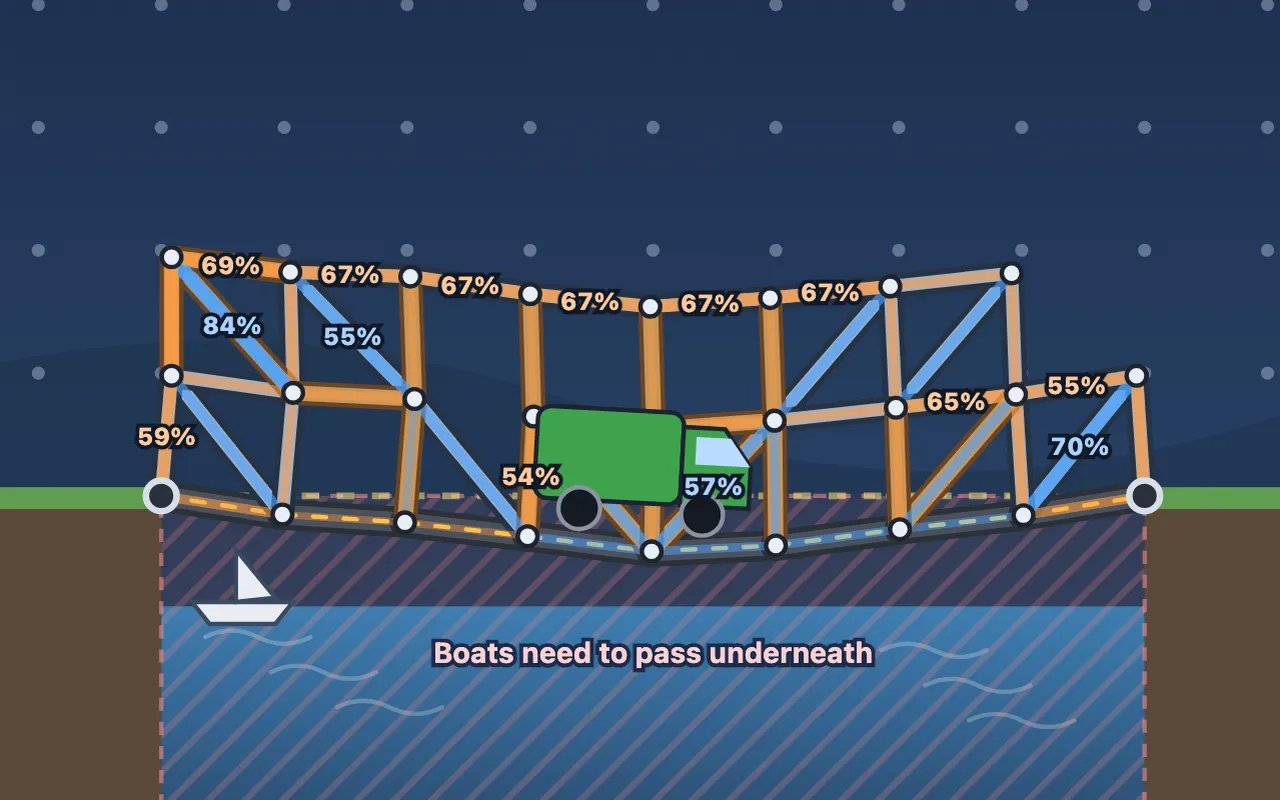
Bridge Builder is a free bridge-building game. Students build a bridge from road, wood, steel and cables, then drive a car, a truck or a crane across it. The game works out the force in every beam the way structural engineers do (the direct stiffness method). Beams snap when they’re pulled too hard, crush or buckle when they’re squashed, and bridges without triangles fold up.
How to play
Choose Road and drag along the dashed line from one bank to the other. Then add wood and steel beams to hold it up, joining the points of the grid. Tick Show forces to colour every beam: blue is pulled (tension), orange is squashed (compression), and red is over its limit. When you’re ready, press Drive and watch your bridge take the load.
Each level earns up to three stars: one for getting across, two for staying within the budget, and three for matching the cheapest design we know.
The levels
| # | Level | Years | Big idea |
|---|---|---|---|
| 1 | Mind the Gap | 8 | Triangles make structures rigid |
| 2 | Triangle Power | 8 | Trusses |
| 3 | Push and Pull | 9 | Tension and compression; strong material where forces are big |
| 4 | Low Bridge | 9–10 | Building under the road; arches |
| 5 | Buckle Up | 10–11 | Buckling gets worse with length; Pratt trusses |
| 6 | Go Deeper | 11–12 | Chord force = bending moment ÷ depth |
| 7 | Cable-Stayed | 11–13 | Cables only pull; cable-stayed bridges |
| 8 | Heavy Haul | 12–13 | Supports in the middle; everything combined |
Tips for teachers
- Years 8–9: let students build a bridge without triangles first and watch it fold. Then ask them why triangles fix it.
- Years 9–11: with Show forces on, ask which beams are pulled and which are squashed, and where the steel should go. Buckle Up shows why long beams in compression are risky.
- Years 11–13: Go Deeper links truss depth to the bending moment, and Cable-Stayed and Heavy Haul are open design challenges. The 3-star target rewards efficient structures.
Every level ends with a short “What you learned” summary you can use as a plenary.
Curriculum links
- KS3 Scienceforces, balanced forces, tension and compression
- GCSE Physicsforces and elasticity
- GCSE Design and Technologystructures, triangulation and choosing materials
- A-level Physics and Engineeringstiffness, stress, buckling and structural analysis
Controls
| Drag from point to point | Build a beam (road goes along the dashed line) |
|---|---|
| Drag to any point | String a cable |
| Tap a beam | Remove it, or swap its material |
| Arrow keys, Space, Enter | Build with the keyboard |
| Number keys / E | Choose a material / the eraser |
Questions about Bridge Builder
Is Bridge Builder free?
Yes. Bridge Builder is free to play in any web browser, with no ads, no sign-up and nothing to install. The teacher pack is free too.
What age is Bridge Builder for?
Bridge Builder is for ages 12–18. Its 8 levels are labelled by school year and cover Years 8–13 in the UK (Grades 7–12 in the US). The first levels need no previous knowledge and the last ones reach A-level ideas.
What do students learn in Bridge Builder?
The levels cover:
- Triangles make structures rigid
- Trusses
- Tension and compression
- Strong materials where forces are biggest
- Longer beams buckle more easily
- Deeper trusses carry bigger loads
- Cable-stayed bridges
- Supports in the middle of a span
Is there a teacher pack for Bridge Builder?
Yes. A free 16-page PDF you can download from this page. It includes:
- Two 60-minute lesson plans (Years 8–9 and 10–13)
- Two worksheets, with answers and a mark scheme
- A level-by-level guide with the 3-star designs
- Curriculum links (KS3, GCSE, A-level, NGSS)
- A paper-bridge practical to follow up the game
Does Bridge Builder work on Chromebooks and iPads?
Yes. It runs in any up-to-date browser on Chromebooks, Windows and Mac computers, iPads, Android tablets and phones, with a mouse, touch or keyboard. A bigger screen makes the later levels easier.